|
|
To view section properties, click the section on the canvas.
|
 Settings
The settings section includes details of the section header and margins.
Show Header
|
Select the checkbox to add a title area on the section header.
|
Caption
|
Shows the name of the section header.
|
Header Alignment
|
Select the alignment of the header text.
|
|
|
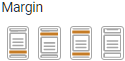
Choose a margin for the section.
Choose from:
oMargin below (the default), oMargin above, oMargin above and below, oNo margins. |
|
 Style
Style
The Style section contains properties that control the font appearance and theme applied to the section header.
Caption
|
Object
|
Details
|
Additional Information
|
|
|
Select the font face for the section header caption.
|
Fonts from the designer's local machine will also be available provided the option to Use Custom Font has been selected in the Account Settings. However if the same font is not installed on the user's machine then a standard font will be used to display the data.
|
|
|
Choose the size of the font for the section header caption.
|
|
|
|
Enter a Hex color code or click on the color box to pick a color for the section header caption.
|
|
|
|
Choose the style of the font for the section header caption.
|
|
Header
|
|
|
Enter a Hex color code or click on the color box to pick a color for the header background.
|
|
Border
|
|
|
Select the border appearance type. Choose from None or Solid.
|
|
|
|
Choose a line weight for the border (in pixels).
|
|
|
|
Enter a Hex color code or click on the color box to pick a color for the border.
|
|
|
|
Select a numeric value to represent the curvature of the section's corners. The higher the number, the more curved the the edges of the object will be.
|
|
Background
|
|
|
Enter a Hex color code or click on the color box to pick a background color for the section.
|
|

|
Select this check box to set the background as transparent.
|
|
Picture

|
Choose a picture as the background of the section. Only previously loaded images are shown in the drop-down.
|
|

|
Select this checkbox to preload the picture file when the app is accessed.
|
|
Align
|
Set the orientation of the selected background picture within the section. Options include: Center, Stretch, and Tile.
|
|
|
See also: Mobile Design Object Properties Panel
Return to: Mobile Design Reference, Mobile Design