File Menu
Item
|
Description
|
Related Topics
|
Save
(Ctrl+S)
|
Saves any changes made to the app since it was opened or last saved.
|
Saving and Closing an App
|
Save as New Version
|
Creates a new version of your app. This is helpful if you want to design multiple versions of an app before publishing (for example, in the early stages of development).
|
Working with Versions
|
Save as New App
|
Saves your app as an entirely new app.
|
|
Publish
|
Publishes your app.
|
Publishing and Deploying Your App
|
Preview
|
The preview option lets you see how your app will look and behave in a Web browser once published.
|
Previewing an App
|
Debug
|
Loads a preview of the app with an additional details panel. This panel shows behaviors and their results as events occur in the app instance.
|
|
Close
|
Closes the app. You will be prompted to save your app if you have not saved changes before selecting close.
|
Saving and Closing an App
|
|
 Edit Menu
Item
|
Description
|
Related Topics
|
Reset Mobile Design
|
Reset will clear all Mobile App Wizard settings and starts a new mobile app. You cannot undo a reset.
|
|
|
Format Menu
Item
|
Description
|
Related Topics
|
|
|
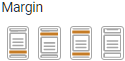
Allows you to choose a margin for your app.
Choose from:
oMargin below (the default), oMargin above, oMargin above and below, oNo margins.
|
|
|
View Menu
Item
|
Description
|
Related Topics
|
Object Markers
|
Hides or shows the state markers for each object. State markers are visual indicators of each object's state. The state of an object can affect whether it is presented to the user (as with a hidden state) or the manner in which it is displayed (as with a read-only state).
|
Limiting User Access to App Fields
|
Workflow Markers
|
Hides or shows markers associated with paths on the workflow diagram. Small icons indicate whether a path has conditions, behaviors and/or notifications defined.
|
|
Help Center
|
Launches the Help Center dialog on top of the App Designer. The Help Center contains links to support documentation and how-to videos.
|
Help Links and Help Center
|
Help Guide
|
Launches a separate browser window that displays the PerfectApps help guide.
|
Help Links and Help Center
|
|
Help
Click Help to open this online help guide.
|
See also: Mobile Design App Properties Panel
Return to: Mobile Design Reference, Mobile Design